Check for the most recent ACK patches/updates
(The link above will often be updated before this page!)
- 3/1/09 – ACK 3.251 released!
Fixes a skipping-sound issue and other bugs. Read the release notes.
Updating from an older version of ACK? Follow the instructions here.
ACK for Windows
- Unzip to the directory of your choice.
- In the “Adventure Creation Kit” folder, double-click “ACK Launcher.exe”
ACK for OS X
>> Download ACK for OS X (Universal Binary)
- Unzip to your Desktop
- Drag the “ACK Launcher” app to the Applications folder
- Double-click the “ACK Launcher” app to run
ACK for other systems (Linux, etc)
>> Download ACK 3.2 (no Launcher)
The above non-Windows/non-OS X version of ACK has no Launcher included and requires that DosBox be installed separately. (Instructions on using DosBox on Ubuntu are here.) Once DosBox is installed, just mount the ACK folder and type ‘ACK’.
- Check your current ACK version by looking at the ACK\UPDATES.TXT file, your current version number is in the first line. Note that you must already have at least v3.200 to use this patch. If you have an older version, or if you have problems with the patch, use the full downloads above.
- Copy PATCH.DAT file to your ACK folder
- Run ACK to auto-apply the update.
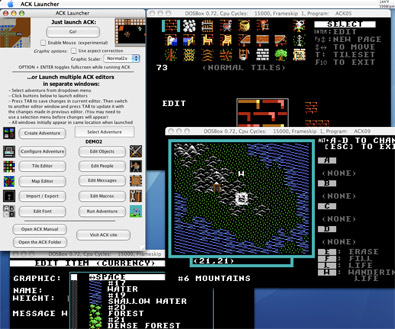
Screenshot of ACK with multiple editor windows open in OS X: