New Apple II song, Jpegs to HGR screens

2009 August 31
by JJ Sonick

So I did finally record a new piece of Apple II music, ‘The Green Sheen’, using DX-1 samples triggered in real time via the Soundchaser keyboard.  Take a listen:

The Green Sheen

Audio clip: Adobe Flash Player (version 9 or above) is required to play this audio clip. Download the latest version here. You also need to have JavaScript enabled in your browser.

download

It appeared on the latest Mozomedia Music podcast ep, and I hope to stick to the plan of one new bit of Apple II music with each new podcast.  As well as recording The Green Sheen, I also finally got the various audio cables I properly needed for the audio cards sorted out, so now I can make good on my promise to share a stereo recording (the former one was mono) of the Ultima IV title music being played through the Apple II’s Mockingboard:

Ultima IV title music

Audio clip: Adobe Flash Player (version 9 or above) is required to play this audio clip. Download the latest version here. You also need to have JavaScript enabled in your browser.

-  download

Getting the cables set up properly also means I now have a mic in for the DX-1 sampler, and can record my own samples!  I did a little test run of this, recording 4 sounds into a new ’sound bank’ and saving them to disk.  Here you can hear me playing back the samples using the Soundchaser keyboard to trigger them again.  The sounds I sampled are an  ’oh’, a vocalized ‘boop’, a click noise, and a quack noise.

DX-1 custom sound samples test

Audio clip: Adobe Flash Player (version 9 or above) is required to play this audio clip. Download the latest version here. You also need to have JavaScript enabled in your browser.

download

I hope to improve the sound quality with more careful, cleaner recordings of future samples, but overall I’m really impressed with DX-1.  I’ll probably ending using it much more for music than the harsher synthesized sounds from the Mountain Systems cards (but I am still interested in experimenting with custom synthesized sounds one can create with the Soundchaser software).

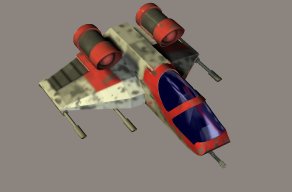
On the graphics front, part of this usenet thread pointed out that a jpeg-to-Apple-II-HGR-screen routine written in Java is part of the Apple II Game Server package (I still need to try out the Game Server!), and I recently compiled that routine as a standalone .jar file (currently it just looks for the jpg in a hard-coded location – if I figure out enough java to add a file selector dialogue, etc., I’ll upload the improved jar to this site).

Here was the jpg I fed into it:
And here was the HGR result:
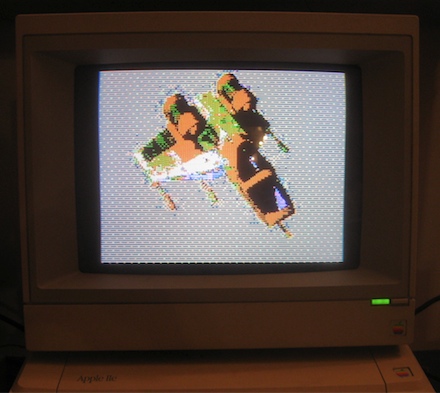
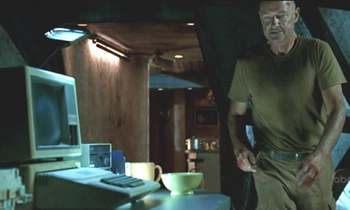
Not too bad – actually the photo makes some the artifacts not as noticeable, but even the real screen’s still pretty nifty.  I may end up converting more jpegs to HGR screens for a project inspired by this intersection of pop culture and the Apple II:

3 Comments leave one →
2009 September 2

This is so very cool. Good to see another post here. Love the music, especially. Thanks for hooking that up.

Also, what kind of HGR screen is in the picture? Is that the standard //e hi-res on a composite monitor? Or is it enhanced somehow with duoble-hires or a special RGB display? Or what? Because I can’t believe a stock //e could reproduce that spaceship thingy so well.

2009 September 4

Thanks, Jeff! It is just a standard HGR screen on a stock composite monitor, but like I said, the photo makes it look a somewhat better than reality. The Apple II HGR screen can actually display some nice images, it’s just a *lot* of work if you’re not cheating something like a jpg-to-HGR utility. That’s because if you’re programming, you have to deal with the bizarre way the screen is arranged in memory just to get your image to appear and then you have to deal with the obnoxious ways the colors can bleed over if they are next to eachother (again, a consequence of the way the screen is represented in memory). Even if you’re using one of the nice mouse- or tablet-driven drawing programs that came out back then, the color issue can be quite annoying. But there are examples from back in the day of nice HGR screens, like from Beyond Castle Wolfenstein -
http://img259.imageshack.us/img259/593/bwolfso0.jpg
Windwalker –
http://www.retrocpu.com/apple-ii/images/games/w/windwalker.png
Rescue Raiders notice how carefully the colors are kept separated by black except for the ground) -
http://www.retrocpu.com/apple-ii/images/games/r/rescue_raiders.png
Aztec -
http://www.retrocpu.com/apple-ii/images/games/a/aztec.png

Also I think the spaceship’s color scheme ended up playing nice with the HGR screen’s 6 colors – more colorful pics will probably fair much poorer – I’ll find out soon!

2009 September 14

Woah – just a follow-up, I’ve tried some other more colorful pics and they were much less successful haha. Making the original jpg black and white (indexed color – 2 color) before converting to HGR seems to give decent results though. So: similar to HGR color palette or strict B&W seem best. I’ll post more on this later…

Leave A Comment

Note: You can use basic XHTML in your comments. Your email address will never be published.

Subscribe to this comment feed via RSS