Mad Max Grognard - Road War 2000

2008 December 5

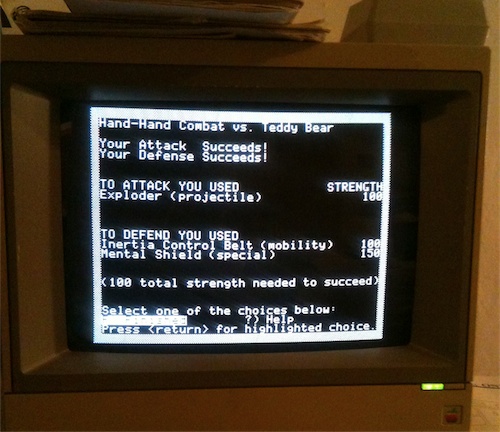
Strategic Simulations Inc. (SSI) was one of the companies known in the 80’s for, among other things, bringing complex turn-based wargaming to the Apple II.  The kind of wargames known for large hex-based maps, complicated rules, combat units defined by many various stats, and simulations of historical conflicts - the kind of gaming grognards (also see here) might like (though how well these complicated table-top wargames translated to Apple II games varied).  As well as historical conflicts, some games explored hypothetical scenarios (NATO vs USSR with then-modern armies, for instance).  Some hypothetical scenarios even reached into a nuclear-war-radiated future complete with cannibals and motorcycle gangs, as evidenced by Road War 2000, which was released by SSI in 1986 (requiring a mere 48k of memory).

Road War 2000 is a turn-based strategy game that puts you in charge of a gang of, well, road warriors in a post-apocalyptic North America.  With the government mostly broken down, you and your gang are the only hope to track down 8 scientists who have a cure for a nasty mutated virus threatening to wipe out what’s left of humanity.  While carrying out this search, you have to take on the rival gangs and factions controlling what’s left of the continent’s cities (hopefully gaining control of the cities yourself) — and to do that you’ll need to amass better and bigger vehicles, more and more-highly-skilled gang members, lots of fuel, weapons and ammo and fight a bunch of Mad-Max-esque road battles.  Well, okay, it’s kinda awkward to place a do-gooder, world-saving quest on the shoulders of high-octane-highway-carnage-makers, but you didn’t come here for the plot, did you?

The game starts you off on a random location on a North American map that’s several monitor screens wide and high in total size.  Here’s an example screenshot:

On this screen you decide to investigate your current location, move to an adjacent location, and various other actions.  A neat thing about the map is that different kinds of locations have truly different qualities - bigger cities will have higher quality vehicles to scavenge and more supplies, but likely tougher enemies lurking in them than towns; oil fields have lots of fuel available but are usually already watched over by a strong rival gang, etc.   Moving costs fuel and food, so there’s strategy involved in every move you make.  A complaint about the map screen:  you press a number key to choose direction of movement, but on a keypad the numbers do not match the compass point positions they represent - they’re counter-intuitive.  This seems to be a holdover from other SSI games of the same era.

You can Search a location for loot (vehicles and weapons) or people (new gangmembers), all of which you desperately need at the beginning of the game.  When looking for new recruits, you’ll encounter various groups who may join you, or fight you.  If there’s a fight with a ‘footgang’, you get to enjoy the most unfun part of the game.  These battles are tiresome scrolling text ‘2 Gangmembers killed’ , ‘1 Gangmember killed’ affairs with no input available for tactics, etc.   These battles are often very rough, too, especially when you’re starting the game. You can send out a scouting party to get the lay of the land first (for instance, to discover that the town is held by deadly religious fanatics, which tells you you’d probably want to skip scavenging for now), but those scouting excursions can cost you personnel as well.

Fortunately, the actual road battles make up for the annoying footgang battles.  Here your vehicles, with their various ratings of maximum speed, maneuverability, carrying capacity, breaking and acceleration capability, etc. come into play.  Here’s an example stats screen of a vehicle:

You’re shown a top-down view of the battleground, which is nicely detailed and, like the N. American map, several screens wide and tall.  As well as roads, vegetation, fences, and various obstacles you’ll also see the flaming wrecked vehicles of other gangs’ battles littering the road (and you’ll add your vehicles to their number if you’re not careful!). Here’s an example:

And another portion of the same battle area:

You can manually choose (within certain limits) the starting locations of your vehicles and choose which gang members will occupy which vehicles, or have the computer automatically handle that set-up.  Appropriately Road Warrior-ish, you can (and should) deploy men both in and *on top of* your vehicles.  Then it’s time to rumble!

Road combat is pretty engrossing because there are a lot of factors at play.  A vehicle’s maneuverability effects how many 45 degree direction changes it can make during a single turn, and is further effected by speed and damage.  Moving fast is helpful to avoid getting rammed or boarded (yes, both you and the enemy can board and capture each other’s vehicles), but can end up taking you where you don’t want to go thanks to momentum and reduced maneuverability (tactical braking is just as important as accelerating).  Ramming is a useful tactic but can do damage to both vehicles (unless it’s a flatbed truck vs. motorcycle situation).   Your vehicle’s facing is ever important since it determines both where your current speed will force you to go as well the directions its crew can shoot in.

The AI seemed fairly competent in the road battles I’ve fought so far.  It moved its vehicles into decent line-of-sight positions to shoot at me, and certainly took full advantage of ramming me when I sloppily passed too close with flank exposed.  I did see one of its vehicles get unnecessarily stuck between some of the flaming wreckage on the road, so it might be a mixed bag.

Overall, Road War 2000 offers a unique setting for turn-based strategy and an original flavor of tactical combat, despite some various quirks.  I need to play more to render a final judgement, but it seems to have enough detail to be interesting, but not so much detail as to be overwhelming, and I’m definitely motivated to play more to witness some epic many-vehicle battles - bring on the trailer trucks!

The Mockingboard Sings

2008 November 26
by JJ Sonick

A group of South Korean Apple II enthusiasts have been making some homebrew clones of the Mockingboard sound card and selling them on eBay recently.  I was lucky enough to win one of these auctions, and the card arrived last week and was installed this weekend.

Here it is installed in slot 4 (that’s the Disk Controller card in slot 6).

Here’s another shot that shows the stereo jack line running out the back of the IIe:

The auction made it clear that the speech synthesis aspect of this clone was iffy, but that’s fine with me, because it’s the music/sound effect aspect of it that I’m interested in.

I ran the stereo jack to the two desktop speaker/floor bass speaker unit I’d previously used with a PC that died a year and half ago (the speakers had just been gathering dust), and it sounds great!  I went through the Mockingboard demo disk and also loaded up Ultima IV and liked what I heard.

I’ve gone through a Word doc version of the Mockingboard manual, but I haven’t had time yet to make any original music with it.  But here’s a sample of some of the Ultima IV music playing though it, which is charming enough to almost make me want to try to finish that game again.  Both Virtual II and AppleWin do pretty good Mockingboard emulation, but, of course, there’s something special about hearing the real thing (or a clone of the real thing ;) ):  Unfortunately, I only have one mike, which means this is a mono recording and you’re missing the cool way the two lead voices are each panned to a different speaker, but it still gives you a taste of Mockingboard-ness:

>> Listen to the Ultima IV title screen music played through the Mockingboard clone

(Edit: I’ll try a direct-in stereo recording later this week, and replace the mono one above with it if I’m successful)

Money in Space - Earth Orbit Stations

2008 November 18
EOS intro

EOS intro

The intro screen (shown above) for Earth Orbit Stations features a nice animation of a space shuttle launching, and the game that follows that neat intro does not disappoint.  EOS was programmed by Karl Buiter and published by Electronic Arts in 1987.  It puts you in charge of building and turning a profit from, you guessed it, space stations orbiting not only Earth but potentially other planets of our solar system as well.

An interesting twist in the set-up is that you are not simply running a government-funded, NASA-sponsored project - you are one of several entrepreneurs competing to make money with your station, through a combination of commercial and research uses of your station’s modules, and by building new and more advanced stations.  Rivals, who can be either computer-run or actual human players, will be building their own stations and trying to beat you to reach the goal of whatever particular mission you’ve currently chosen.

The interface is very nicely handled, which saves this fairly complex program from being too clunky on an Apple II.   A big block serves as the cursor, which you move by the joystick to select menu options or to inspect and place station modules.  The menus themselves are easy to navigate - moving around to get the information you need goes pretty smoothly.  There is an amount of disk-swapping you have to endure when first loading the game (and when first creating your own mission disk to save gaves onto), but once you’re playing, if you’ve got two drives, there doesn’t seem to be any annoying swapping at all.

Each game turn is a fiscal quarter.  You’ll start by being greeted with news articles for the current quarter, which you can peruse or ignore.  Most of these have to do with the fluctuations of various markets, but there are some flavor ’scientific discovery’ and such news items.

Once done with the news, it’s wise to hop into the Commerce menu and check the market activity screen, which will show a color-coded summary of which markets (pharmaceuticals, forestry, resources, etc etc) are on the upswing, which are stable, and which are falling.  This info will help you plan what new station modules to buy, and tweaks you may want to perform on your existing modules.

Then you can head to the station screen, where you can peruse, buy, and place new modules, and even start additional stations if you have the funds.  Each station has to have a set number of bare necessity ’support modules’ (living quarters, power, gym facilities, etc.), after that you’re free to build as you like, constrained by your money (you can take loans, deposit money in savings, etc) and your tech level.  You can, for instance, install a solar collector module which will give you a big energy boost, as well as being available for commercial and research uses.

Each module has its own crew and energy requirements, as well as quarterly upkeep cost.  Each module can either be set to commercial use (you basically lease it out to those who will pay), research (gives you technology points), or deactivated (if you don’t have enough of a support coverage to go around, for instance).  When you buy a module, you rotate it and place it sorta Tetris-piece style in the ‘grid’ of your station.  Connector pieces form the backbone of your station around which the modules attach.

Here’s the humble beginnings of my station in my first game:

My EOS station

My EOS station

And here’s it a little further on:

My EOS station, expanded

My EOS station, expanded

BTW, I apologize for the dodginess of the screenshots (like the washed-out-ness of the first of the two above).  While it would be very simple to get emulator screen captures, I’d rather post images of games running on the actual Apple hardware, but I haven’t figured out the best settings for doing this yet with my Canon PowerShot - so I apologize for scanlines and other ugliness.

You’ll notice in the second station screenshot that some of the modules are green - this represents that they have been set to commercial use for the current quarter.  The non-support modules that are not green are carrying out research (a disabled module will show as blue).  In the commerce menu, you can see how much use paying customers are making of your available modules, and combine this info with the current status of the markets to decide if you’re going to change the rate you’re charging for that kind of module, or switch a module to research or even de-activate it.

Here’s a shot of inspecting a module from the Commerce menu (the big ugly scanline is not on the actual screen but thanks to my poor photography skills) :

Looking at a module in the Commerce Menu

Looking at a module in the Commerce Menu

It’s pretty fun expanding the station, and gives you an immediate incentive to manage things wisely so you’ll have more moolah to expand further and get more advanced stuff.  And, of course, there’s your competitors to goad you as well.

The first mission I tried was a race to see who’d have the most recent points by a certain end date.   You have to have everything set to commerce as first, to build up enough funds to keep you going and expand, and then switch some over to research.   I started to think my two computer opponents, the dastardly ‘apple 2′ and ‘apple 3′, were dim bulbs, because as we neared the end date, they both still had almost all their non-support modules set to commerce, where I had been doing a balancing act for awhile, steadily building up some research.  Unfortunately, I was wrong about their dim bulb-ed-ness - by the very last quarter their increased funds had allowed them to expand very far.  In fact, evil apple 3’s station filled the whole screen:

Apple3s station

Apple 3's station

And he dastardly switched all those commerce modules to research his last turn, funneling in the research points!

Apple 3 is a jerk

Apple 3 is a jerk

This won Apple 3 the game.  I did beat Apple 2 though, who had tried a variation on the switch-at-the-last-minute strategy.  Anyway, it seemed to bode well for the AI not being a push-over.

There’s also a lot of things I didn’t get to see in this particular game - with advanced stations you can have a docking station for space shuttle missions, send out planetary probes, maintain a space hospital, do mining and refining, even attach a propulsion unit to your station to make it mobile and take it other planets.  So I should be getting some more fun out of this well-designed game.

Apple IIe is Go

2008 November 13
tags:
by JJ Sonick

Just a quick post that the Apple IIe purchased from Digital Dinos is now up and running.  I won an eBay auction for a homebrew Mockingboard clone, so I figured I should set up the IIe so it’ll be ready to receive that sound card.

Set-up went smoothly. I installed the Expanded 80 Column Card and the Disk Drive Controller Card in the IIe, hooked up the drives, monitor, and power, and gave it a spin.

Apple IIe Setup

Apple IIe Setup

I used Infocom/Westwood’s Battletech game to test both the extra memory on the 80 Column card (the game requires 128k)  and to test the drives (it can use 2 drives).

My IIc in pristine shape, its case clean and non-aged.  This IIe on the other hand has typical yellow-y aging on the case, and is also scuffed up and marked a bit.  Yet I never had a IIc growing up, I had a IIe.  I have a more immediate connection with the IIe’s size, shape and the feel of its keyboard.  Using it feels more like an authentic time machine. :D

Apple IIe closeup

Apple IIe closeup

The IIc has certain advantages:

  1. Its compact size means there’s a bit more deskspace when it’s occupying the computer table instead of the IIe.
  2. Its headphone jack is *very* handy for recording its audio output (I ran it straight into a Zoom H4 recorder).  Since making 8-bit music on these computers is one of main interests, that’s a big plus for getting a clean recording.  The on-its-way Mockingboard clone has some kind of ’stereo jack’ - I’ll have to see how well that works, but even so, for non-Mockingboard audio, like RT.SYNTH, I’d have to stick a microphone somewhere near the IIe case.  So for doing final recordings of Apple II audio, I may end up mostly using the IIc.
  3. I would need another card (a super serial card) to do disk transfers with ADTPro on the IIe.  With the IIc, you just use its built-in serial port.

Nevertheless, the IIe’s greater nostalgia/personal time-machine aura means I will probably use it more, outside of the necessary audio recording and ADT uses of the IIc.  And of course, the IIe’s expandability though its available card slots is a huge plus, and something that drives a large portion of the current 8-bit Apple enthusiast community.  Playing with the Mockingboard should be good fun, and I *do* want to get and try out the Uther ethernet card and the CFFA card (basically a Flash card hard drive for the 8-bit Apples) at some point.  For that matter, a TransWarp card is looking good to speed up some of the slow SSI strategy games I’ve been playing. :)

New 8-bit Musical Instruments

2008 November 9
by JJ Sonick

Thanks to Simon Williams’ site 8-bit Sound and Fury (be sure to check out the software and great Apple II-generated music there) and Michael J. Mahon’s Real Time Synthesizer, I’ve begun my musical journey with 8-bit Apples.

Simon’s site and an email conversation with him lead me to look closer at Michael’s RT.SYNTH, which allows the real-time playing (via your computer keyboard) of 8 different synthesized instruments (one instrument at a time), each of which can play in 6 octaves. You can switch between instruments and octaves in real-time, and record and play back your performance as well. It’s is all software-driven, requiring nary a Mockingboard or other add-on hardware. For all the juicy details, visit Michael’s site (linked to above).

It is also possible to build new virtual instruments (voices) for RT.SYNTH. After I emailed him about creating new voices, Michael kindly provided extra info and some programs he uses to build the voices. I had many false starts, producing wav files (transferred to disk images thanks to Apple Commander) that crashed the voice-generation programs, and after that producing voices that crashed RT.SYNTH once loaded. :D

But fortunately I was able to produce two new, working voices. I have to say, it really helps to do work like this on an emulator, as parts of the audio-processing procedure would be painfully slow on the actual Apple, whereas I could crank Virtual II’s speed up and whip through it (which also made it less painful to start over when the voice didn’t work). On the other hand, Virtual II’s sound emulation, which is solid in general, makes a slow-responding, tinny mess of RT.SYNTH’s music. To really hear its instruments as intended, you need to run RT.SYNTH on an actual Apple. So once I discovered the voices were functional, I was happy to transfer their disk image over to my IIc via ADTPro and try them out for real.

Both voices are based on a sample of one of Logic Pro’s clavinet instruments, which I’m very fond of. By the time I had created the first non-crashing voice, I had still messed up either the sample, the sequencing of the sample, or both, but it turned out to be a happy accident, as it produced a off-kilter spacey timbre that would not sound out of place in an 80’s video game:

>> Hear a bit of the Spacey Voice

The second non-crashing voice used more portions of the same sample, and was more ‘correctly’ constructed, as it sounds more like the original. But it’s too short (fades too quickly for it to achieve the clavinet sound) and ends up not be as fun as the ‘mistake’ voice. I’ll revisit it later and try to get it closer to the clavinet original:

>> Hear some of the Sorta-Clavinet-y Voice

I’ll be sure to work on some more voices, and post a disk image of them once I’ve made a decent collection, for any other RT.SYNTH users to try out.

Hi-Res Graphics Mind Meld

2008 November 1
by JJ Sonick

I read a description of how memory addressing for the hi-resolution screen works three times, each time from a different source.  The first two times my brain simply melted before such a byzantine structure.  The third time it finally clicked.  Surely this had something to do with it being my third attempt to grasp the concept, but I believe even more of it had to do with the third source’s description being the most clear, well-written and well-illustrated.

That third source is “Applesoft BASIC Subroutines & Secrets” by Jeanette Sullivan and David Sullivan. It appears to be an excellent book all around.  Below are scans of the two pages on hi-res memory addressing, to assist anyone else puzzling out the same issue:

Hi Res Memory Addressing 1

Hi Res Memory Addressing 1

Hi Res Memory Addressing 2

Hi Res Memory Addressing 2

(click on the images above to download full-size scans)

The book also includes a nifty little BASIC program that will compute the address of any particular block, and lays out the formula the program uses, further reinforcing how the addressing works.  Scans of that are below.

Hi Res Memory Addressing Program

Hi Res Memory Addressing Program

Hi Res Memory Addressing Program

Hi Res Memory Addressing Program

(click on the images above to download full-size scans)

In assembly programming news, “Assembly Language for the Applesoft Programmer” continues its traditional of clear writing/explanations and annoying typos in listings.  I’m also going through Don Lancaster’s “Assembly Cookbook for the Apple II/IIe” — Lancaster completely skips over the basics (he basically waves his finger at you and says ‘Don’t you dare think of using an assembler until you’ve learned to code 100s of lines of machine language on your own’), but has lots of opinionated advice on surrounding aspects of assembly.  I’m learning, slow but steady.

Will Wright, Meet the First Sim…

2008 October 26

Some of the Maxis open-ended simulation games (SimCity, SimCity 2000, SimLife, The Sims) have been personal favorites and huge time-evaporators for me, so I thought it appropriate for my first mini-review here to be of an Apple II predecessor of The Sims, Activision’s Little Computer People (aka House on a Disk).

Will Wright has said in a CNN interview that he did play Little Computer People “a long time ago. I’ve since gotten to know several people who were involved with that project, and many of them gave valuable feedback on The Sims…”.  This makes sense, since, although they are very different games, there are some interesting similarities in their core mechanics, and of course, the setting.

Little Computer People presents itself as a research project where you, as researcher, get to observe and interact with one of the, you guessed it, Little Computer People living inside your Apple.  This is reinforced by the instruction manual including a place for you to take notes on the habits of your LCP (I’ll use this abbreviation, which the manual does as well, from here on), the title screen of the game featuring a lab research notebook, etc.

The game’s main setting is a a cutaway view of a 3-story house. In this house lives your LCP and his pet dog. As you watch, your LCP will putter about his little domain, performing various everyday tasks and enjoying ocassional diversions.  These activities include making dinner, reading the newspaper, washing up, talking on the phone, feeding the dog, listening to music, etc.  Like a Maxis Sim, the LCP will autonomously move about the house and perform activities on their own, but also, like a Maxis Sim, the LCP may not take the best care of themselves — you may end up needing to remind him to drink water, eat, etc.

This is where the interaction comes in - you can type commands to your LCP, such as PLEASE DRINK WATER, PLEASE FEED THE DOG - they appear at the top of the screen and on pressing return, you LCP will usually oblige your request (it also apparently improves their mood of you THANK him after he does so!).  It might be different on the other versions of LCP, but on the Apple there seems to be some weirdness with when you can and can’t type in commands - sometimes you type, but your input does not appear in the ‘text’ area up top.  This doesn’t happen enough to be truly annoying, however.

You can play games with LCP - anagrams and a couple of card games - which will boost his mood, and one particularly amusing form of interaction is the LCP sitting down at the typewriter and writing a letter — the letter will be addressed to you and will highlight the ways the LCP is currently pleased or annoyed.  In addition, you can refill the LCP’s water cooler, deliver human and dog food to the door, and “pet” the LCP (a little mechanical hand extends beside the lounge chair, which will pet the LCP once he sits in the chair).

Little Computer Person about to write a letter

Little Computer Person about to type a letter

I was going to try to make a little video of some of the gameplay, but I discovered someone else has saved me the trouble!  Thank you, bluecolor3k (note the sound effects are not so annoying when playing LCP on an actual Apple II):

>> Watch Little Computer People gameplay on YouTube

So how is it as a game (or as a simulation/toy)? The graphics are very charming, and the actions of the LCP amusing, and it’s certainly a very innovative game design.  I’d imagine that after seeing everything the LCP does many time, it would start to get old (this was a problem with the Sims for me as well - at least until I started downloading and mixing-and-matching all the crazy custom content that users made for the game).  However, there is one thing in particular that’s keeping me playing currently - Luther’s mood.

Different LCP (there’s only one per disk) have different ‘digital DNA’ - meaning they have different likes and dislikes.  My LCP’s DNA must have strong sequences of EMO. See this page from the instruction booklet:

Little Computer Person moods

Little Computer Person moods

And see my LCP, Lucas, close up:

Lucas the Sad

Lucas the Sad

He always has that expression.  I give him water, food, pet him, play games with him and he still keeps his frown.  I bought my copy used, and the ‘researcher name’ that shows on the title screen is ‘Francisco Quesada’, and maybe Francisco was a very abusive LCP owner, leaving me with tons of LCP bad blood to undue.

Little Computer Person Abuser?

Little Computer Person Abuser?

Regardless, I’m determined to make that sour bastard Lucas happy.

Little Computer People manual

Little Computer People manual

Hello, Assembly

2008 October 22
tags:
by JJ Sonick

As well as a attempting a simple RPG in BASIC, I’m also getting my feet wet with Assembly.  I have two main goals with Assembly, ones that cannot be reasonably achieved with BASIC:

  1. Sound creation and manipulation
  2. Tile-based graphic scrolling ala the early Ultima games.  Even as I’m coming to general grips with Apple II graphics, I have no idea how this was done, so I’m curious to explore it.

An ultimate goal with tile-based scrolling would be do make some sort of super-simplified Starflight clone (I was always jealous that Starflight didn’t exist for the Apple II) — but that is REALLY pie-in-the-sky - I’d be happy just make a successfully little one-area demo. ;)

I’ve just started “Assembly Language for the Applesoft Programmer” by Finley and Myers, and it seems pretty well written.  Despite the title, it’s not about just getting some binary programs to run from your BASIC programs, it’s more a full-on assembly tutorial aimed at weaning a programmer away from BASIC and into pure assembly.  Assembly’s making sense so far, a lot of which is probably due to my working through the wonderful book Bebop Bytes Back 6 years ago or so.

I’m using the Merlin assembler, which seems to have a very friendly environment, and I’m delighted it allows the entry of decimal numbers, which I’ll be using to “cheat” as much as possible (sorry, purists).

One alarming thing: there was a typo in one of the early sample programs in the “Assembly Language for the Applesoft Programmer” - a typo that was in fact repeated twice.  The program was simple enough that I was able to spot it immediately, but it makes me worried about the longer, more complicated program listings - I might not spot the typos so easily there, which could lead to lots of frustration.  If that becomes a problem, I may have to switch to some other book, which would be a shame, because I like the clear writing in this one.

Project: Scruffy and the Sword game

2008 October 22

One Apple II project I’d like to pull off would be a very simple rpg game inspired by the skit ‘Scruffy and the Sword’ by my comedy group Come On, Scientists!.  In the skit, two rather odd adventurers  are in search of a Vorpal Sword (the bearded adventurer, Scruffy, is played by yours truly).  They begin they search at a collectibles shop/garage sale, end up traveling through time, and encounter a powerful foe, the Black Spirit of Self-Awareness.  Since the skit goofily deals with rpg goofiness, it seems only natural to base a goofy game on it.

For the game, I’d stick to the medieval setting - Scruffy and Sidekick can simply be “in character” as adventurers, having come to a little towne where they’ve heard tale of a Blacksmith who can make a perfect +2 Vorpal Sword.  In the game’s intro, they would witness the Blacksmith’s cursing the sword and throwing a mighty far distance - all the way, in fact, to a nearby orc-infested tower.  To retrieve the sword, they’ll have to travel to several different locales, bash various monsters, and collect gold to buy better weapons/armor til they’re finally strong enough to storm the tower.

I’m planning to program this in Applesoft BASIC, relying on the Beagle Brothers’ tremendous Beagle Graphics to create hi-res images, and their ProntoDOS routines to allow speedy loading (for the Apple II) of those images.  The Beagle Graphics program Double Plot has turned out delightful to use, especially in an emulator so I can draw with the mouse (though I do plan to get a mouse for the actual Apple IIs sometime).  Here is the first (and only so far) screen I’ve done, the ‘Presents’ screen that will precede the Title Screen:

Scruffy and Sword game Presents screen

Scruffy and Sword game Presents screen

Since I’m using BASIC, I think it’d be best to keep things simple.  They’re won’t be any animation or even single frame sprite-shapes moving about the screen — all graphics will be static screen images and all input will be menu-driven (Beagle Graphic also allows for easy programmatic printing of text to the Hi-Res screen from BASIC).  So for instance, in Town, the top half of the screen will show a picture of the various buildings Scruffy and Sidekick can enter, and on the bottom half will be a simple lettered menu reiterating those choices (Where should we go?  A. Marv Ellis’s Shoppe B. The Blacksmith C., etc), with one choice being Leave Town. When the player leaves town, a new image is loaded showing the nearby landscape and available place to go, and an appropriate menu.   Likewise, combat will be a similar affair, if a bit more complicated display wise: An image of the enemy on the upper left half of the screen, an image of Scruffy and Sidekick on the upper right half with stats displayed below each (that text would be dynamically added after the picture has loaded), and the bottom half would be used for hi-res text, alternating between menu of choices and displays of battle results.  That kind of display for combat would be similar to, but simpler than, the ones used in Wizardry, The Standing Stones, Wasteland and such. Here’s a Wasteland combat for example:

Wasteland Combat example

Wasteland Combat example

The Double.Scrunch utility provided with Beagle Graphics allows nice compression of hi-res images that must be stored on and loaded from a disk.  Using it, I’m hoping I can get around 40 hi-res images on a single disk (I’ll be making hi-res and not double hi-res images to save space).  The game would then consist of two disks.   The first disk would hold the BASIC program, the required Beagle Graphics loaders, and a few introductory images.  After the BASIC program loads, and intro graphics are viewed if the player wishes, the player is asked to insert disk 2 into the drive.  After that, all images needed are loaded from disk 2 as the game unfolds.

With that framework, I’m hoping I can make an amusing little game.  We shall see…

The beginning…

2008 October 18
by JJ Sonick

My first Apple II was a IIe, the computer of my youth, the computer of endless days of playing the early Ultimas and the Infocom text adventures, of planning a super-elaborate world to implement in Stuart Smith’s Adventure Construction Set which I never got close to finishing it, of being amazed I could make the computer do something with BASIC, even though I had none of the attention span to program anything substantial.  Needless to say, I have very fond memories of that computer I grew up with.

In the late 90’s, when I first ventured onto the wild Internet, I was amazed and delighted at the existence of Apple II emulators and disk images that let me re-live some of the fond memories of my youth.  But as charming as the emulators were, it still wasn’t quite the same thing.

Fortunately for me there existed a Goodwill Computer Store right on the other side of the freeway from the Half Price Books store I worked at when I lived in Austin, Texas.  For a mere $15 I acquired an Apple IIe, color monitor, and 2 disk drives.  I also discovered eBay and started tracking down games familiar and unfamiliar that I wanted to play on the trusty IIe, as well as ransacking my parent’s attic to uncover some of the games I’d owned as a kid (amazingly, my mother had no thrown many of them out).  A little while after the same Goodwill store offered up an Apple IIc with 128k which would allow me to play some games that the IIe couldn’t (I hadn’t real spent time looking online for a memory card for the IIe, and the IIc was only $10, so how could I resist?

I had great fun with that IIe and IIc, but there was always the problem of space - I had a computer desk for the PC I used for modern computing concerns, so whichever Apple II I was going to use had to live in some akward corner of my bedroom.  This resulting in them never getting used as much as they could have been.  The IIe ended up dying of unknown causes (old age?) a little while after I moved to San Francisco in 2000.  The IIc lasted much longer, carrying on strong til early last year (2007) when it got fried by a power surge that brought down my entire street block (as well as my TV, DVD player, PC, I don’t remember what else - some neighbors had their refrigerators fried, so I considered myself lucky - and yes, I was using a surge protector, but a surge protector plugged into a socket with faulty wiring (insert doh! emoticon)).

There was painful attempt at rebuilding my PC which lead to so many hardware nightmares that I threw in the towel and did something I’d been contemplating for awhile - switch to a Mac.  The fact that Boot Camp seemed fairly stable at this point was a big tipping factor, meaning I would not have to ditch all the Window software I’d paid for over the years.  Anyway, the relevance of my switch to Mac to old-school Apple concerns is that my new MacBook Pro laptop lives, for the most part, on my living room table in front of my couch which means… the old PC table was available to hold a Apple II!

So just last month I acquired a IIc through ebay and a IIe through online retailer Digital Dinos.  The monitor I had for the previous Apple II ’set’ miraculously survived the Great Electrical Purge of 2007, so I didn’t need to go monitor hunting again.

The Apple IIe is still boxed up, as the compact form of the Apple IIc is better suited to how I have the desk set up, but the IIe will gets its turn for sure.  But right now, the IIc has the place of honor:

I really should have started this blog last month, as my Apple II (re)-explorations have already taken me in several different directions, and my first several posts will be playing catch-up to cover those.

Before I finish this post, I should perhaps answer the question, “Why?  Why this interest in this decades-old hardware and software?” Well, it’s fair to say I have a fascination with retro-gaming and retro-computing in general. Nostalgia is obviously a strong part of it.  So would I have any interest in this stuff if I hadn’t experienced it as a child?  This was partially answered for me when I became fascinated for a good deal of time with a ZX Spectrum emulator and the games available for it.  The Spectrum was a 8-bit computer I had never seen or touched as a kid, but I found myself intrigued by some of its best games, in a way that was similar to interest in Apple II games I had never played as a kid.  I think what interests me in these cases is seeing how much a person or a team could pull out a system that has some very tough constraints (and in the Apple II’s case, serious quirks - I don’t know how quirky the Spectrum’s workings are or aren’t).  There’s something inspiring about that creative effort within tight confines - especially when the final product retains some magic despite being run on (emulated or actual) decades-old technology. Examining those creative efforts will be part of what the blog covers, as I survey some of the Apple II games and apps of the past (and of course, some marvelous creations of the present, like Michael J. Mahon’s Real-Time Synthesizer.)

The other part of the blog will me inexpertly bungling around trying to create some new Apple II programs myself, and seeing what odd experiments can arise.  And overall, I’ll have some fun. :)